Unfortunately but the specter of Internet censorship has finally came to Lithuania a few years ago. It was rampant already in some European countries but I never thought that it would come to Lithuania as well. I thought that this country was different… nope, it started to slowly transform and become like others in terms of Internet censorship as well.

History
As far as I can tell everything was fine up until around 2008, 2009. It all began when on 2010 July 8th a court in Lithuania, Vilnius satisfied a lawsuit by which foreign gambling companies such as “bet365 Ltd.” and “Unibet International Ltd.” were blocked from doing their business in Lithuania. Accordingly, their websites must be blocked, the court said. The decision was appealed and the court case dragged further into the future.
Around 2011, LANVA (the Lithuanian anti-pirate association) sent a request to the IVPK (the committee of expansion of the information society) to block Linkomanija (as far as I know, it’s the biggest private torrent tracker in Lithuania). One of the responsibilities of that committee is to propose new laws to the parliament which are related to the Internet, author rights, and so on. After a meeting, they decided not to go further with the request from LANVA however they said that they were available for more discussions about this topic in the future.
In 2012, global events affected Lithuania as well. During that year, the whole notorious ACTA crisis unfolded. Because people all over the world generated a lot of discussion around this topic, even the Lithuanian news media gave attention to it. What is more, local protests were organized where people were rallying for Lithuania to not sign the controversial act. As far as I know, it was never signed. After that, everyone quickly forgot about it. Thus, there were no changes with regards to Internet censorship in Lithuania.
In 2013, amendments to the law with regards to gambling were being considered. Numerous events were organised around discussions if Lithuania is going towards the censorship of the Internet. However, no decision was yet made because of a certain case that had been on-going in the European Court of Human Rights. It all culminated the following year.
In 2014, the European Court of Human Rights decided that EU countries can indeed block access to webpages which violated the rights of authors (the term “rights” has a very vague definition, obviously). That means that from that moment various institutions can go to courts to get certain websites blocked in their own country in the European Union. After this, the court decision to block various gambling companies went ahead in terms of blocking their pages online as well.
After some time, during 2015 some changes to the law were finally approved to implement a framework with which websites could be blocked. At that time it was clearly legal to do that in the European Union, and on 2016 January 11, betway.com became the first officially censored webpage in the Republic of Lithuania.
Implementation
The current censorship is implemented by modifying DNS records at the ISP level. The blocked websites’ A records are modified so that they would redirect to https://blokuojama.lpt.lt/. In there, the user is informed that the website that they tried to visit is “blocked” and it links to the court cases due to which those websites were “blocked”.
We could see how blocking works by using drill to send a few requests to DNS servers. First one up is my ISP’s one. Let’s see what response it gives:
giedrius@tyrael:~/ > drill betway.com @192.168.1.254
;; ->>HEADER<<- opcode: QUERY, rcode: NOERROR, id: 6156
;; flags: qr rd ra ; QUERY: 1, ANSWER: 1, AUTHORITY: 0, ADDITIONAL: 0
;; QUESTION SECTION:
;; betway.com.  IN      A

;; ANSWER SECTION:
betway.com.     10760   IN      A       194.135.95.243

;; AUTHORITY SECTION:

;; ADDITIONAL SECTION:

;; Query time: 2 msec
;; SERVER: 192.168.1.254
;; WHEN: Fri Mar 23 20:28:37 2018
;; MSG SIZE  rcvd: 44
As you can see, betway.com (the first website that was ever blocked in Lithuania) is apparently at 192.135.95.243.
To see if it is really there, let’s check the A records of the same domain at 8.8.8.8, Google’s relatively popular DNS server:
giedrius@tyrael:~/ > drill betway.com @8.8.8.8
;; ->>HEADER<<- opcode: QUERY, rcode: NOERROR, id: 53085
;; flags: qr rd ra ; QUERY: 1, ANSWER: 2, AUTHORITY: 0, ADDITIONAL: 0
;; QUESTION SECTION:
;; betway.com.  IN      A

;; ANSWER SECTION:
betway.com.     59      IN      A       45.60.87.104
betway.com.     59      IN      A       45.60.114.104

;; AUTHORITY SECTION:

;; ADDITIONAL SECTION:

;; Query time: 90 msec
;; SERVER: 8.8.8.8
;; WHEN: Fri Mar 23 20:30:51 2018
;; MSG SIZE  rcvd: 60
As you can see, the real results and the censored results differ. Indeed, if you would go to 192.135.95.243, it would redirect you to blokuojama.lpt.lt which is the title page for all censored websites.
Some people were talking that this is not enough and now they are pushing new laws which would make ISPs implement deep packet inspection. The ISPs themselves, on the other hand, argue about the effectiveness of that and who is going to give them money to buy expensive equipment which would let them to perform these functions. Plus, obviously, they are presenting many more valid arguments against Internet censorship. For example, many of them argue that they just provide an utility to customers and they don’t want to become the second police who would decide what content is “good” and what content is “bad”. This point of view of ISPs is briefly presented here at the end of the article.
Statistics
All of the data – relevant cases and URLs – about blocked websites is presented here. If we were to put all of that into a diagram (different domains count as different sites) we would get this:
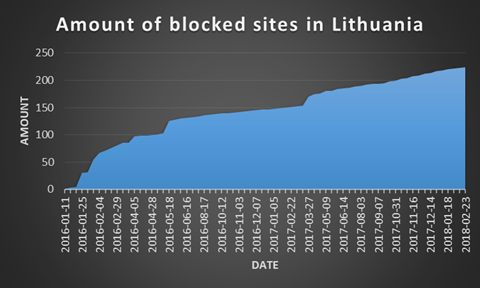
As you can see, the number of blocked sites has been increasing a bit faster than linearly. If the current trend continues, around 500 sites will be blocked by the beginning of 2020. Hopefully, this will not be true. I guess that I will have to revisit this assertion again in two years.
How to circumvent this?
In general, you will have to change your settings so that your computer would use a different DNS server. There are plenty of options to choose from. The popular choices are 8.8.8.8 and 8.8.4.4 (Google DNS servers) however if you have any privacy concers with them then you can choose some other ones from, for example, here or here. Obviously, you should not choose a DNS server that is censored as well. So choose wisely.
Once you have done that, continue to the next two sub-sections depending on what you prefer. They do not cover all of the routers and operating systems but they give you a general gist of where to look for more information and give an example of how it looks like.
Router level
In general I would recommend you to search for something like “router model + admin panel” or “router model + DNS settings” and you should most certainly find something. I will present how to change the DNS settings on a router that is provided by the most popular ISP in Lithuania, Telia.
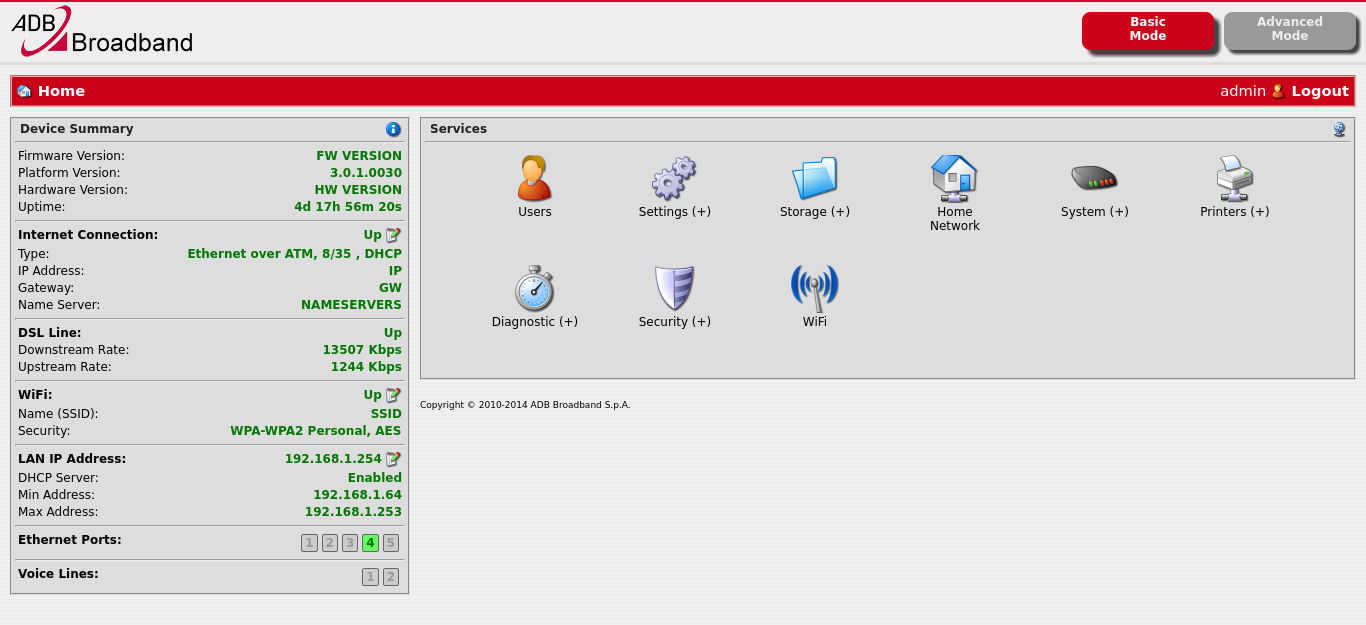
- Go to the admin panel which is usually at the same IP as the gateway. In my case, it is http://192.168.1.254. The default username and password is admin/admin. Enter your own username and password if you changed them. You will get into this:
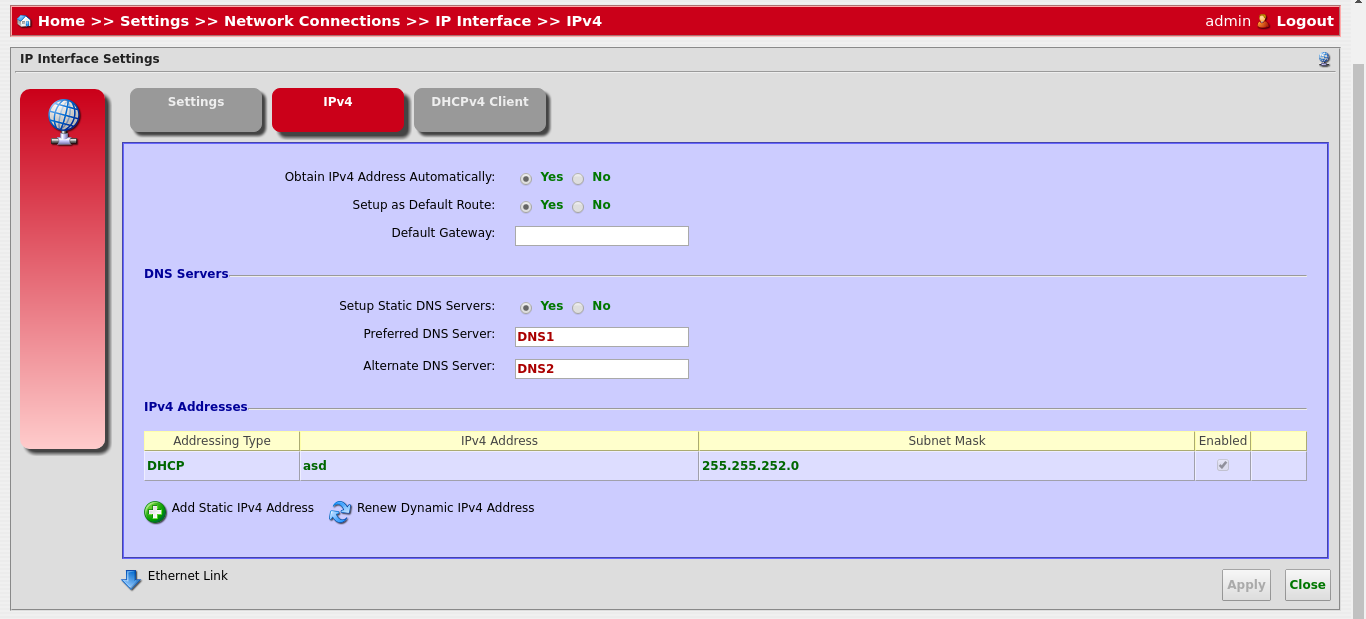
- Go to Settings > Network Connections > WAN DSL > IPv4 (tab). There you can find a checkbox “Setup Static DNS Servers”. Click on “Yes”. Then you should be able to input your preferred and an alternative DNS server. You should see something like this:
- After setting your DNS servers, click on “Apply”. You might have to restart your router to really apply the settings. Enjoy!
Operating system level
It seems that Windows 10 is still the most popular operating system on desktop computers so I will provide a way to change your DNS settings on it.
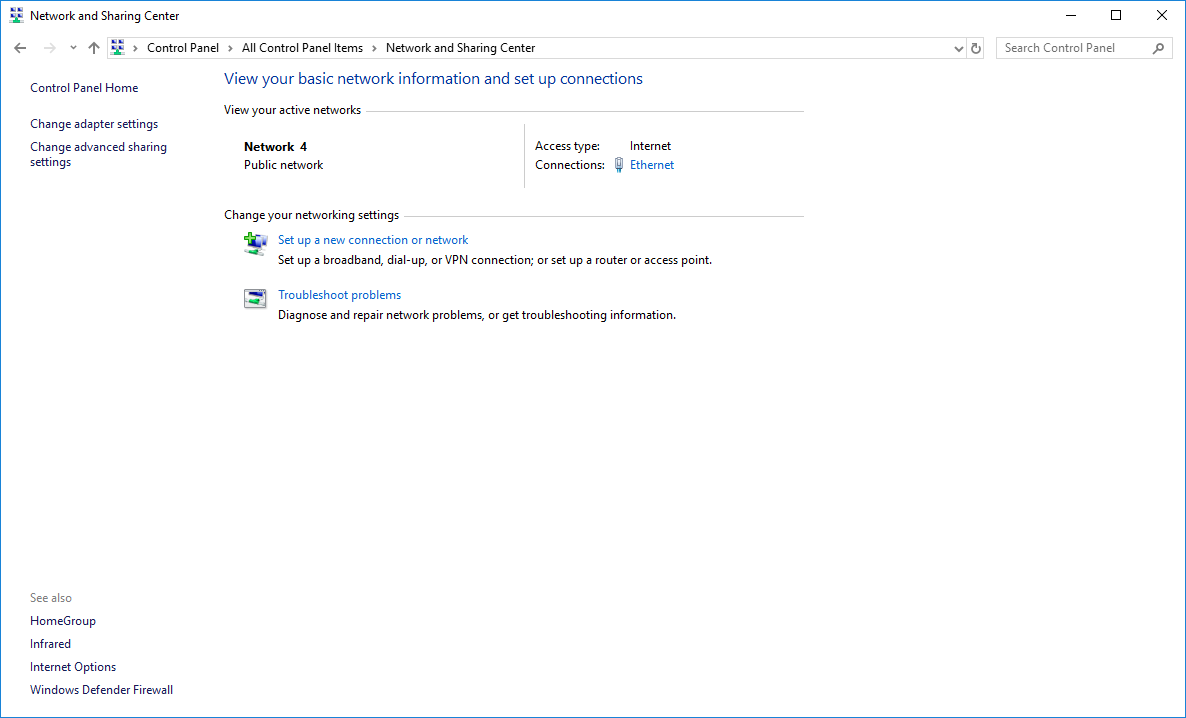
- First go to Control Panel > Network and Sharing Center:
- Click on “Change adapter settings” and then click on “Properties” on the connection that you use to connect to the Internet:
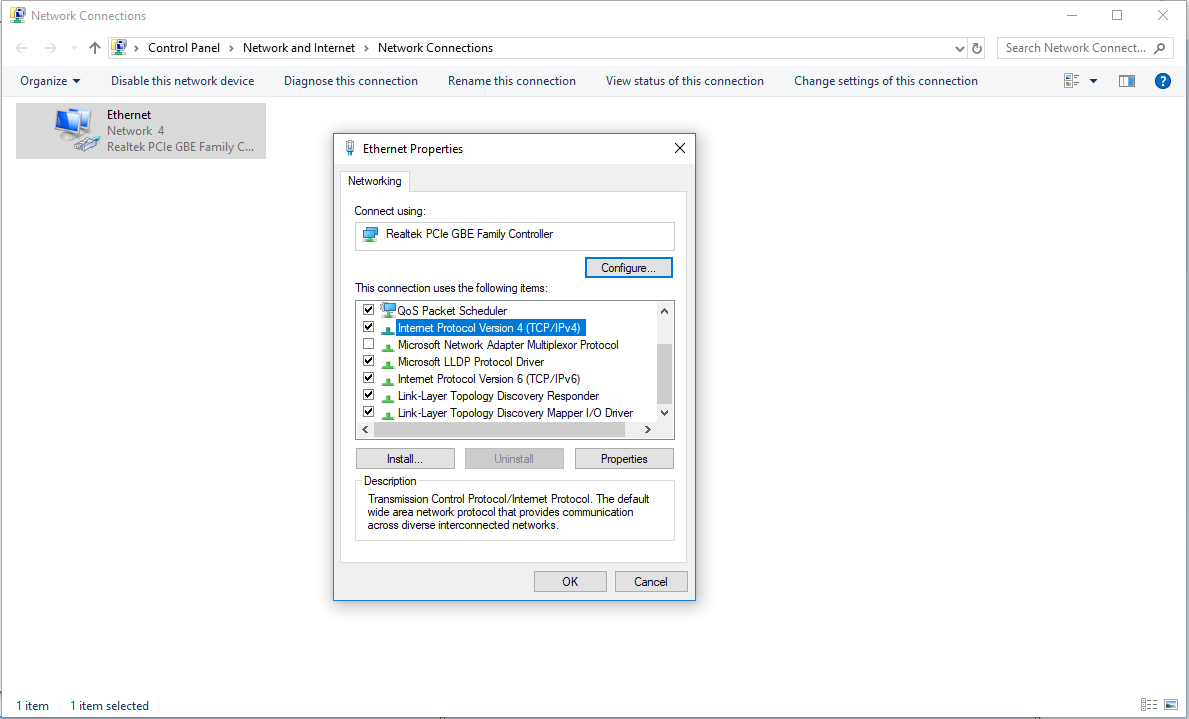
- Go down to “Internet Protocol Version 4 (TCP/IPv4)” and click on “Properties”. Inside there you can change the DNS settings. Choose “Use the following DNS server addresses” and enter the IP adresses of your choice:
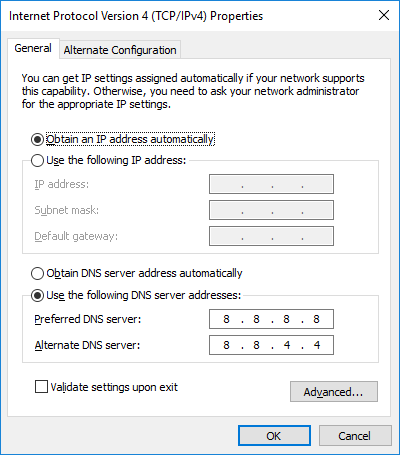
- Once you are done click on “OK”. Et voilà!